ARM Neon
參考相關資料
在 camera 這邊我們是透過QT Qcamera 收取影像來源 在透過QImage 去產生image 做利用
因為QImage 吃的格式有限制
QImage
Note: In general QImage does not handle YUV formats.
加上USB camera 進來會是YUYV (YUY2) 格式 IP camera 進來會是 I420p 格式
所以在這邊需要做格式轉換從YUV -> RGB
可以透過QT 直接去轉換
在CameraFrameGrabber::supportedPixelFormats 這邊只有return QVideoFrame::Format_RGB32
這樣在QT發現當下的格式不是RGB32時 會自己轉換格式
但是這邊造成CPU loaging太高了 約佔掉70-80% 可以說用掉1個半CPU
所以我們想要利用neon指令 來優化程式效率
Neon 是 ARM 的SIMD 指令 (Single Instruction Multiple Data),
在ARM cortex 系列才有支援 主要用在media 相關的處理
有支援C & C++ language (#include <arm_neon.h>)
所以可以看到有人用C 或 S 寫
主要register type 是D(64bits) & Q(128bits), 共有D0~D32 對應到Q0~Q16
所以每兩個D register對應到一個Qregister
這邊有幾個項目需要注意一下
- NEON instructions execute in their own 10-stage pipeline
- ARM can dispatch 2 NEON instructions per cycle
- ARM → NEON register transfer is fast
- NEON → ARM register transfer is slow
- NEON instructions will physically execute much later than they appear to in the code
- 32 64-bit (“doubleword”) registers: d0-d31
- 16 128-bit (“quadword”) registers: q0-q15
- qN is aliased to d(2N), d(2N+1)
- e.g., q0 == d0, d1
- q4-q7 are callee-saved
- VPUSH {q4-q7}
- VPOP {q4-q7}
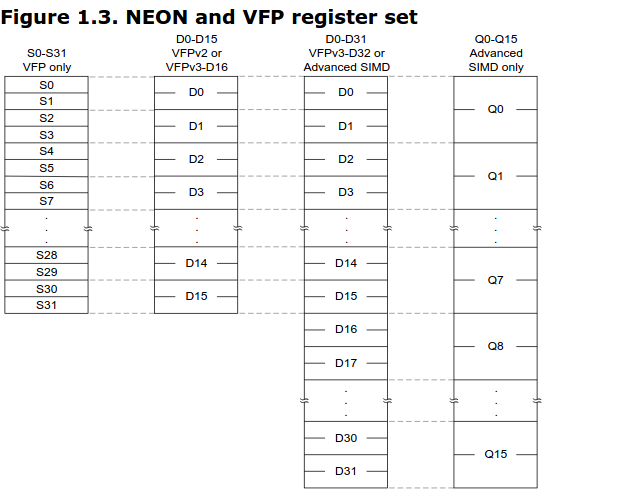
在arm_neon.h 內可以看到相關的C用到的定義
在Neon下很重視 對齊 所以格式需要符合要求 才能做存取的動作
所以當不對齊時 需要做調整
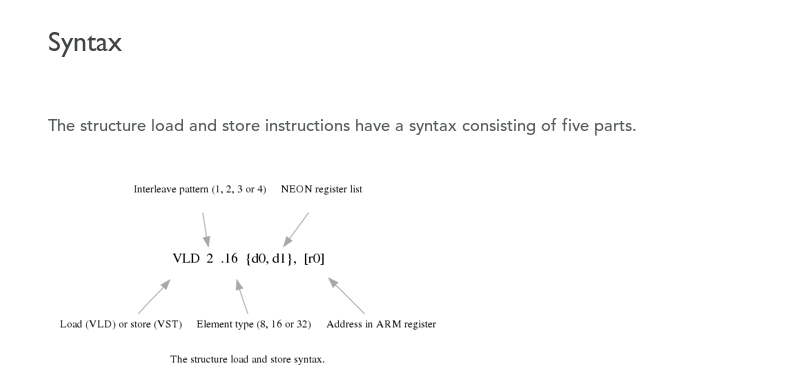
uint8x8_t vld1_u8 (const uint8_t *)
第二个字段'ld'表示加载指令
第三个字段'1'(注意是1,不是l)表示顺次加载。如果需要处理图像的
RGB分量,可能会用到vld3。关于vld/vst指令更详细的说明,请自己参阅arm官方文档。
從memory load to neon 跟從neon load 到memory 的方式如下: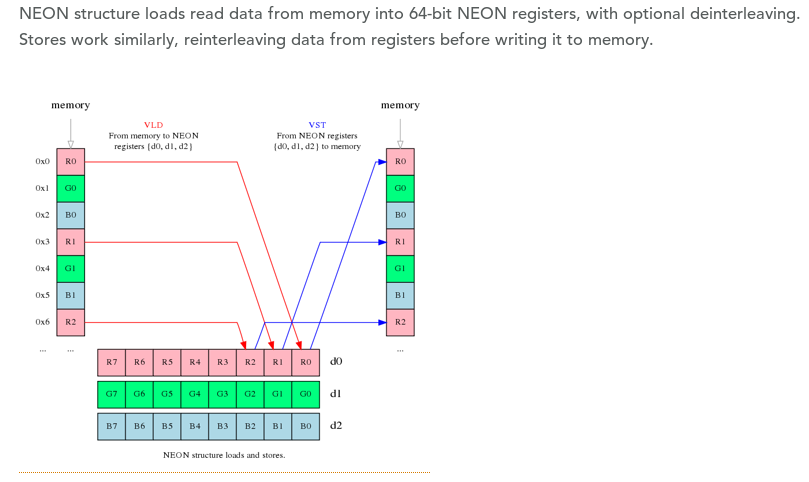
##YUV 格式 紀錄
在影像儲存格式中YUV是常見的格式
目前確定USB camera 會用YUYV 跟MJPG
IP camera 有用到I420P
YUV,分為三個分量,「Y」表示明亮度(Luminance或Luma),也就是灰度
值;
而「U」和「V」 表示的則是色度(Chrominance或Chroma),作用是描述>影像色彩及飽和度,用於指定像素的顏色。
與我們熟知的RGB類似,YUV也是一種顏色編碼方法,主要用於電視系統以>及模擬視頻領域,它將亮度信息(Y)與色彩信息(UV)分離,沒有UV信息
一樣可以顯示完整的圖像,只不過是黑白的,這樣的設計很好地解決了彩>色電視機與黑白電視的兼容問題。並且,YUV不像RGB那樣要求三個獨立的>視頻信號同時傳輸,所以用YUV方式傳送占用極少的頻寬。
原文網址
對人類而言 亮度的感受 會比色度來的明顯
這是因為人眼視網膜是由兩種感光細胞組成的
分別是三種錐狀細胞(cone cell,以下稱CC)和一種桿狀細胞(rod cell,以>下稱RC)
三種CC能分別感應RGB三種波長的光 負責色彩感受(這就是光學三原色的由
來)
RC則是負責亮度的感應 且RC對微光的敏感度比CC還強得多
這就是為什麼當你晚上在房間摸黑時 所有東西看起來都是接近黑白的 沒>什麼顏色
YUV 的格式有分很多種排列方式
IP camera 用到的I420p是 YUV420p 它跟 YUV420sp在UV這邊排列方式是>不一樣的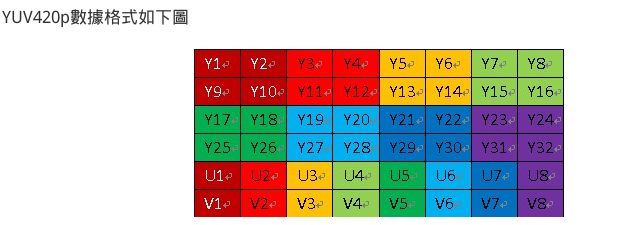
NV12: YYYYYYYY UVUV =>YUV420SP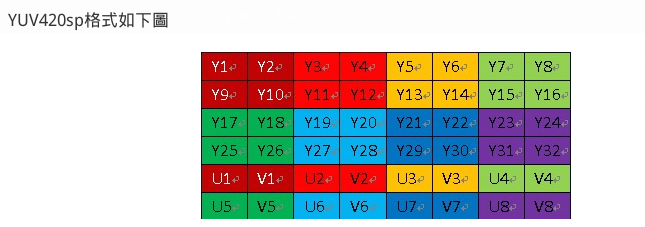
在I420轉RGB這邊 用NEON可以大大的減少CPU loading 如下表
| 方式 | CPU loading | time |
|---|---|---|
| QT 轉換 | 70% | N |
| C code(RGB24) | 40~43% | 6-14ms |
| NEON(RGB32) | 30~32% | 2-4ms |
USB camera YUYV(YUY2) 用的排列方式是 YUYV的方式 下圖的Cb = U Cr=V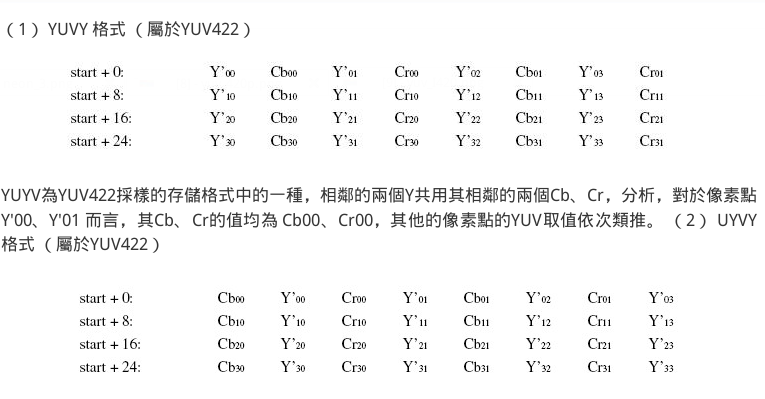
因為排列方式不一樣 所以用的YUV to RGB演算法耶不一樣
目前在網路上可以直接找到的neon yuvTOrgb 比較多得是I4202RGB NV212RGB 等
YUY2RGB 的部份找不到
有試過先轉成I420 在轉成RGB發現顏色上面會失真
轉的方式是保留兩個 Y 在UV這邊留下一個偶數行的部份
int YUY2ToI420(unsigned char *in, unsigned char *out, int _width, int _height){
    long pixels = _width * _height;
    long macropixels = pixels / 2; // macropixel count
    // new size will be w * h * 3/2 -> 12 bits per pixel 4:2:0
    const size_t stride = align16(_width);
    //long mpx_per_row = info.biWidth / 2;
    long mpx_per_row = stride;
    // for each macropixel
    for (int i = 0, ci = 0; i < macropixels; i++){ // ci is chroma index
        // get macropixel address, order is Y0 U0 Y1 V0
        unsigned char *mpAddress = in + i * 4;

        // copy luma data
        out[i * 2] = mpAddress[0];
        out[i * 2 + 1] = mpAddress[2];
        // copy chroma data - we skip odd rows because of 4:2:0 sampling
        long row_number = i / mpx_per_row;
        if (row_number % 2 != 0) {
            out[pixels + ci] = mpAddress[1]; // shift by Y vector
            out[pixels + pixels / 4 + ci] = mpAddress[3]; // shift by Y and U vector
            ci++;
        }
    }
    return pixels * 12 / 8; // I420
}
測試過透過ffmpag libswscale 轉換 效果也不好
來源1 來源2 來源3
#if LIBAVCODEC_VERSION_INT < AV_VERSION_INT(55,28,1)
#define av_frame_alloc  avcodec_alloc_frame
#endif
int swscale(unsigned char *p, unsigned char *rgb, int src_w, int src_h)
{
 //   const int src_w=640,src_h=480;
 //   unsigned char *rgb, *p;
    AVFrame *pFrame = av_frame_alloc();
    AVFrame *pFrameRGB = av_frame_alloc();

    avpicture_fill((AVPicture*) pFrameRGB, rgb, PIX_FMT_RGB24, src_w, src_h);
    avpicture_fill((AVPicture*) pFrame, p, PIX_FMT_YUYV422, src_w, src_h);

    struct SwsContext *img_convert_ctx = sws_getContext(src_w, src_h, PIX_FMT_YUYV422, src_w, src_h, PIX_FMT_RGB24, SWS_BICUBIC, NULL, NULL, NULL);
    sws_scale(img_convert_ctx, (uint8_t const* const*)pFrame->data, pFrame->linesize,0,src_h,pFrameRGB->data, pFrameRGB->linesize);
    sws_freeContext(img_convert_ctx);
    av_freep(&pFrameRGB);
    av_freep(&pFrame);
    return 0;
}
目前有做一些實驗確認 USB camera CPU loading 的問題點
- 移除呼叫YUYVtoRGB的code 這樣測試出來 CPU loading 一樣是60%
- 在 CameraFrameGrabber::present(const QVideoFrame &frame) 加上count 超過5時會直接return trun 測試出來CPU loading 一樣60%
- 將格式直接呼叫I420toRGB neon CPU loading一樣60%
- 建立一個red QImage 畫上去 不呼叫轉換的code跟memory copy
CPU loading一樣57% 左右img = QImage(640, 480, QImage::Format_RGB32); img.fill(QColor("red")); - 拿掉 emit frameAvailable(img); CPU loading 掉到35%
- 跑qml or gstreamer, CPU loading 是2-4% 猜測問題點在來源(input) 目前沒有解
- 透過 mjpg_streamer 測試 USB camera 發現CPU loading 大約46%
所以可以大概判定是source 來源問題